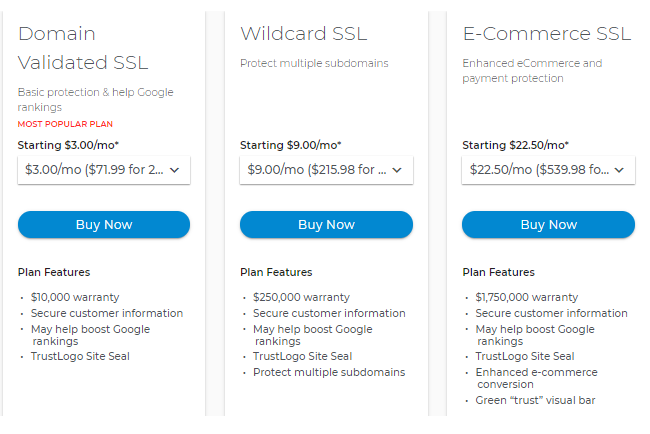
How to Install your Dedicated SSL
-
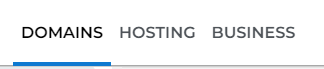
Log in to your Domains dashboard.
- On the dashboard, select the domain name you wish to modify.
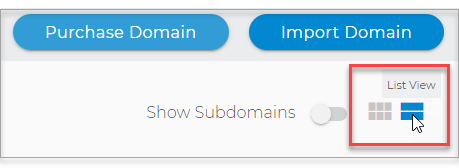
There are two views in the Domains dashboard - the card and list views. Click on the view icons to switch to your preferred view.
- Choose the domain you are working on.
In the
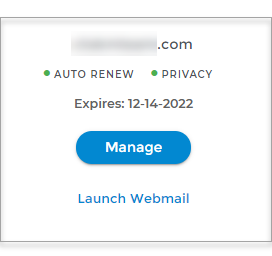
card view, click the domain's
Manage button.
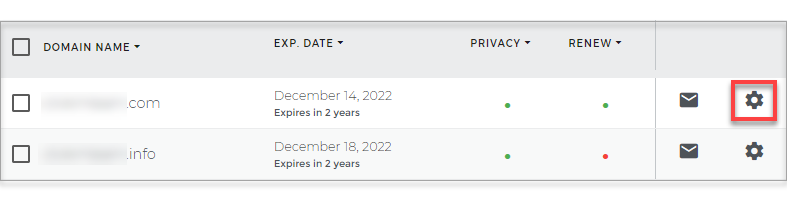
In list view, click the domain or its gear icon on the right-hand side.
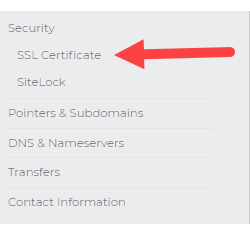
- On the left pane, hit SSL Certificate.
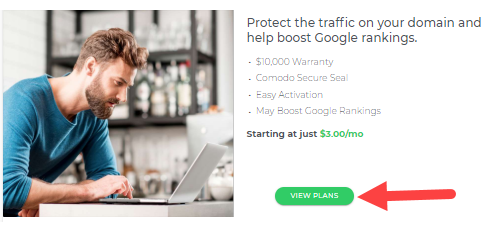
- Click on VIEW PLANS to check the SSL plan suitable for your need.
- Follow the on-screen instructions to purchase and install a Dedicated SSL for your domain.
Dedicated SSL FAQ
What is a dedicated SSL?
The most common type of SSL certificate allows your domain to be displayed in the web browser's address bar when users visit your site. Simply put, the SSL is 'dedicated' to your domain rather than being shared across various users on a server.
Can I apply a dedicated SSL to a specific subdomain?
Dedicated SSL must be assigned to the 'www' subdomain and are not available for any other subdomain.
Once I install an SSL, can I view my website through the regular 'HTTP://' instead of 'HTTPS://'?
You lose the benefit of your SSL if you try to visit your website through a nonsecure method ('HTTPS is secure, 'HTTP is nonsecure). Additionally, many web browsers will throw a security error if you try to visit an SSL website using a non-secure method. We recommend setting up a {"props":{"pageProps":{"appEnv":"production","brand":"netfirms","article":{"urlName":"online-security-dedicated-ssls","title":"Online security: Dedicated SSLs","summary":"A dedicated SSL allows you to display your unique domain name in the URL field of an internet browser while granting a secure connection.","panelType":null,"legacyArticleId":"1875","lastModifiedDate":"2026-07-27 13:41:58","createdDate":"2026-07-27 13:41:44","content":"\u003ch3\u003eHow to Install your Dedicated SSL\u003c/h3\u003e\r\n\r\n\u003col\u003e\r\n\t\u003cli\u003e\r\n\t\u003cp\u003eLog in to your \u003ca href=\"/controlpanel/foundation/\" target=\"_blank\"\u003eDomains dashboard\u003c/a\u003e.\u0026nbsp;\u003c/p\u003e\r\n\r\n\t\u003cdiv align=\"left\"\u003e\u003cimg alt=\"Login to your Domains Dashboard\" src=\"https://content.endurance.com/img/dns_1453_10c.png\" style=\"width: 100%; max-width: 500px; margin: 15px 0px; border: 1px solid #ffffff\" /\u003e\u003c/div\u003e\r\n\t\u003c/li\u003e\r\n\t\u003cli\u003eOn the dashboard, select the domain name you wish to modify.\u003cbr /\u003e\r\n\tThere are two views in the Domains dashboard - the card and list views. Click on the view icons to switch to your preferred view.\r\n\t\u003cdiv align=\"left\"\u003e\u003cimg alt=\"Card and List view\" src=\"https://content.endurance.com/img/dns_1453_14.png\" style=\"width: 100%; max-width: 350px; margin: 15px 0px; border: 1px solid #ffffff\" /\u003e\u003c/div\u003e\r\n\t\u003c/li\u003e\r\n\t\u003cli\u003eChoose the domain you are working on.\u0026nbsp;\r\n\t\u003cdiv class=\"well\"\u003eIn the \u003cstrong\u003ecard view\u003c/strong\u003e, click the domain\u0026#39;s \u003cstrong\u003eManage\u003c/strong\u003e button.\r\n\t\u003cp\u003e\u003cimg alt=\"Domain Dashboard - Card View\" class=\"img-responsive\" src=\"https://content.endurance.com/img/email_1400_2.png\" style=\"width: 250px;\" /\u003e\u003c/p\u003e\r\n\r\n\t\u003cp\u003eIn \u003cstrong\u003elist view\u003c/strong\u003e, click the domain or its gear icon on the right-hand side.\u003c/p\u003e\r\n\r\n\t\u003cp\u003e\u003cimg alt=\"Domain Dashboard - List View\" class=\"img-responsive\" src=\"https://content.endurance.com/img/email_1400_3.png\" style=\"width: 600px;\" /\u003e\u003c/p\u003e\r\n\t\u003c/div\u003e\r\n\t\u003c/li\u003e\r\n\t\u003cli\u003eOn the left pane, hit\u0026nbsp;\u003cstrong\u003eSSL Certificate\u003c/strong\u003e.\r\n\t\u003cdiv align=\"left\"\u003e\u003cimg alt=\"SSL Certificate\" src=\"https://content.endurance.com/img/ssl_1748_3.png\" style=\"width: 100%; max-width: 250px; margin: 5px 0px; border: 1px solid #b4b4b4\" /\u003e\u003c/div\u003e\r\n\t\u003c/li\u003e\r\n\t\u003cli\u003eClick on \u003cstrong\u003eVIEW PLANS\u003c/strong\u003e to check the SSL plan suitable for your need.\u0026nbsp;\r\n\t\u003cdiv align=\"left\"\u003e\u003cimg alt=\"View Plans\" src=\"https://content.endurance.com/img/ssl_1748_4.png\" style=\"width: 100%; max-width: 500px; margin: 5px 0px; border: 1px solid #b4b4b4\" /\u003e\u003c/div\u003e\r\n\t\u003c/li\u003e\r\n\t\u003cli\u003eFollow the on-screen instructions to purchase and install a Dedicated SSL for your domain.\r\n\t\u003cdiv align=\"left\"\u003e\u003cimg alt=\"SSL Plans\" src=\"https://content.endurance.com/img/ssl_1748_5.png\" style=\"width: 100%; max-width: 600px; margin: 5px 0px; border: 1px solid #b4b4b4\" /\u003e\u003c/div\u003e\r\n\t\u003c/li\u003e\r\n\u003c/ol\u003e\r\n\r\n\u003cp\u003e\u0026nbsp;\u003c/p\u003e\r\n\r\n\u003ch3\u003eDedicated SSL FAQ\u003c/h3\u003e\r\n\r\n\u003cp\u003e\u003cstrong\u003eWhat is a dedicated SSL?\u003c/strong\u003e\u003c/p\u003e\r\n\r\n\u003cp\u003eThe most common type of SSL certificate allows your domain to be displayed in the web browser's address bar when users visit your site. Simply put, the SSL is \u0026#39;dedicated\u0026#39; to your domain rather than being \u003ca href=\"/help/article/online-security-shared-ssls\" target=\"_blank\"\u003eshared \u003c/a\u003e across various users on a server.\u003c/p\u003e\r\n\r\n\u003cp\u003e\u003cstrong\u003eCan I apply a dedicated SSL to a specific subdomain?\u003c/strong\u003e\u003c/p\u003e\r\n\r\n\u003cp\u003eDedicated SSL\u0026nbsp;must be assigned to the \u0026#39;www\u0026#39; subdomain and are not available for any other subdomain.\u003c/p\u003e\r\n\r\n\u003cp\u003e\u003cstrong\u003eOnce I install an SSL, can I view my website through the regular \u0026#39;HTTP://\u0026#39; instead of \u0026#39;HTTPS://\u0026#39;?\u003c/strong\u003e\u003c/p\u003e\r\n\r\n\u003cp\u003eYou lose the benefit of your SSL if you try to visit your website through a nonsecure method (\u0026#39;HTTPS is secure, \u0026#39;HTTP is nonsecure). Additionally, many web browsers will throw a security error if you try to visit an SSL website using a non-secure method. We recommend setting up a \u003ca href=\"/help/article/how-to-create-a-301-redirect\" target=\"_blank\u003e301 redirect\u003c/a\u003e\u0026nbsp;to prevent customers from accidentally visiting your website through non-secure methods.\u003c/p\u003e\r\n\r\n\u003cp\u003e\u0026nbsp;\u003c/p\u003e\r\n\r\n\u003ch3\u003eSSLs and 301 redirects\u003c/h3\u003e\r\n\r\n\u003cp\u003eYou can use a \u003ca href=\"/help/article/how-to-create-a-301-redirect\" target=\"_blank\u003e301 redirect\u003c/a\u003e\u0026nbsp;to force website visitors to use a secure \u0026#39;HTTPS address when visiting your site instead of the regular \u0026#39;HTTP address. Using a 301 redirect helps to prevent users from getting \u0026#39;insecure\u0026#39; or \u0026#39;unsafe\u0026#39; warnings in their internet browser.\u003c/p\u003e\r\n\r\n\u003cp\u003eWe highly recommend that you set up a 301 redirect whenever you use an SSL. If you are not sure how to set up a 301 redirect, learn how to with our \u003ca href=\"/help/article/how-to-create-a-301-redirect\" target=\"_blank\u003eknowledge base article\u003c/a\u003e.\u003c/p\u003e","categories":["F_SSL_Certificates","General"],"articleNumber":"000001748","aiSummary":null},"articleProvider":"SFDC","brandConfig":{"title":"Netfirms Knowledge Base","baseArticleURL":"/help/article","baseArticleURLDEV":"/help/article","basePath":"/help","host":"www.netfirms.com","propertyName":"Netfirms","slugPropertyName":"Netfirms","searchProvider":"SFDC","articleProvider":"SFDC","adobeLaunchScript":"https://assets.adobedtm.com/530368109655/e8a350bf6621/launch-f6aca7ad8f77.min.js","searchPlaceHolder":"How can I help you today?","articleCacheTTL":14400,"topArticlesCacheTTL":86400,"topArticlesTitle":"Educational resources you can trust.","recommendedArticles":[],"pageConfig":{"homePage":["SearchHero","recommendedArticles","Categories","ContactHero"],"resultsPage":["SearchHero","Breadcrumbs","ResultsFilters"],"articlePage":{"SearchHero":true,"ArticleMainContainer":{"ArticleHeaderControls":["Breadcrumbs","Categories"],"ArticleContent":["ArticleTitle","ArticleDescription"]}},"topicPage":["SearchHero","Breadcrumbs"]}},"canonicalURL":"https://www.netfirms.com/help/article/online-security-dedicated-ssls","articleID":"online-security-dedicated-ssls","isProd":true,"isAppProd":true,"categoryNameMap":{"General":"General"}},"__N_SSP":true},"page":"/article/[articleName]","query":{"articleName":"online-security-dedicated-ssls"},"buildId":"5ySwGAYQoyiXdtfZ0Q5mc","assetPrefix":"/help","isFallback":false,"dynamicIds":[6851,1305,2007],"gssp":true,"appGip":true,"scriptLoader":[]}