Online security: Extended Validation SSLs
-
Log in to your Domains Dashboard.

- On the dashboard, select the domain where you want to install your Extended Validation SSL.
There are two views in the Domains dashboard - the card and list views. Click on the view icons to switch to your preferred view.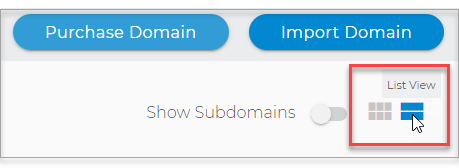
- Choose the domain you wish to modify.
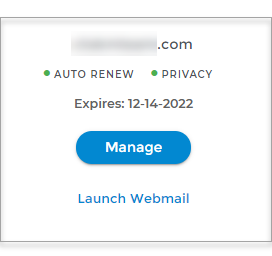
In the Card view, click the domain's Manage button.
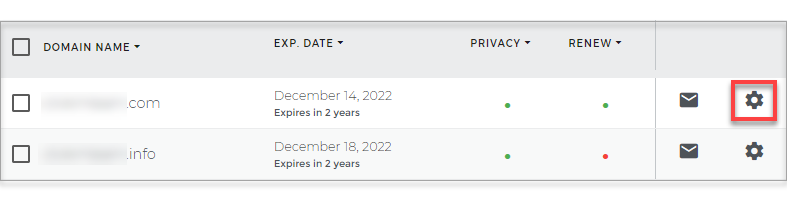
In List view, click the domain or its gear icon on the right-hand side.
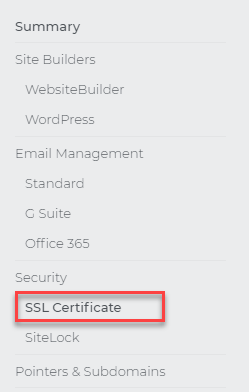
- On the left pane, click SSL Certificate under Security.
Extended Validation SSLs FAQ
What is an extended validation SSL?
A website can only qualify for an EV SSL after it has gone through an extensive validation process. Websites that register and qualify for an EV SSL receive special indicators inside of a visitor's web browser (such as a green URL address bar) to let visitors know that it is an exceptionally secure site.
What are the requirements for an EV SSL?
The requirements will vary depending on the type of entity your website represents:
- Private organization
- Government entity
- Business entity
How long does it take to set up an EV SSL?
A typical dedicated SSL can usually be set up within 4 hours. However, an EV SSL can take up to 10 business days because of the extensive amount of validation required to qualify an applicant.
SSLs and 301 redirects
You can use a 301 redirect to force website visitors to use a secure 'HTTPS address when visiting your site instead of the regular 'HTTP address. Using a 301 redirect helps to prevent users from getting 'insecure' or 'unsafe' warnings in their internet browser.
We highly recommend that you set up a 301 redirect whenever you use an SSL. If you are not sure how to set up a 301 redirect, learn how to with our knowledge base article.