Knowledge Base
Reasons Why Emails Go To Spam
Your emails aren’t making it into your inbox because mailbox providers have developed sophisticated anti-spam technologies that make it harder for spammers to reach the inbox. Unfortunately, this affects legitimate senders too. Smart security measures could send your critical customer emails into a spam folder because of a small mistake.
So what can you do to prevent your emails from going to the spam folder?
You must clearly state who you are or who your company is. Make sure not to include any inaccurate or misleading information in your email.
Your ‘From,’ ‘To,’ ‘Reply-To,’ and routing information, including the originating domain name and email address must be accurate and identify the person or business who initiated the message.
Sounding manipulative, needy, cheap, far-fetched, or shady is a surefire way to flag your email as spam.
Example of trigger words:
Here are some of the subject line best practices you’ll want to follow: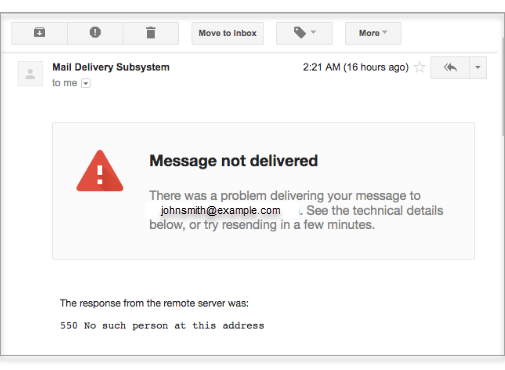
If you do this on a large scale and consistently send emails to inactive addresses, spam filters will penalize your domain or ISP. The odds of your emails going to spam will dramatically increase.
The solution?
Make sure that you regularly clean your email list and delete inactive addresses.
Although email spell checks are useful for catching most things, they won’t find everything. Proofreading is still the best practice to eliminate these errors. Always run a spell check or use a writing assistant app like Grammarly.
So what can you do to prevent your emails from going to the spam folder?
Here are the top reasons why your email might be landing in the spam folder:
- The Sender Information is Inaccurate
- You’re Using Spam Trigger Words
- Weak Headline
- You’re Sending Emails to Inactive Addresses
- Incorrect Spelling and Grammar
- Bad Email Design
The Sender Information is Inaccurate
You must clearly state who you are or who your company is. Make sure not to include any inaccurate or misleading information in your email. Your ‘From,’ ‘To,’ ‘Reply-To,’ and routing information, including the originating domain name and email address must be accurate and identify the person or business who initiated the message.
You’re Using Spam Trigger Words
Email spam filters look at the content within your email to decide whether it goes into the spam folder or to the inbox. If they notice suspicious “trigger words,” your email is likely to be sent to spam even if you have the best intentions.Sounding manipulative, needy, cheap, far-fetched, or shady is a surefire way to flag your email as spam.
Example of trigger words:
- Call now
- Get started now
- Take action
- This won’t last
- Offer expires
Weak Headline
Your email headline is critical. Surveys tell us that 69 percent of email recipients reject email as spam based solely on the subject line.Here are some of the subject line best practices you’ll want to follow:
- Do not use excessive capital letters. It will seem like you’re shouting at recipients
- Do not go overboard with exclamation points
- Never make false promises
- Avoid sounding overly pushy or trying to sell something
You’re Sending Emails to Inactive Addresses
If you receive this bounce-back message, it means that the email was sent to an inactive address and, therefore, not delivered.If you do this on a large scale and consistently send emails to inactive addresses, spam filters will penalize your domain or ISP. The odds of your emails going to spam will dramatically increase.
The solution?
Make sure that you regularly clean your email list and delete inactive addresses.
Incorrect Spelling and Grammar
Spam filters are on high-alert nowadays. Spelling and grammatical errors could land your email in the spam folder. Be extra diligent about double and even triple-checking each email before sending it out.Although email spell checks are useful for catching most things, they won’t find everything. Proofreading is still the best practice to eliminate these errors. Always run a spell check or use a writing assistant app like Grammarly.
Bad Email Design
Here are some best practices to follow when designing an email:- The email should be mobile friendly and desktop compatible
- The email should be on-brand, so people recognize you easily (This includes colors, fonts, images, and tone)
- Your email should not be images only, have the right image to text ratio
- The text in your email should be simple, on point, and easily understood for quick readers