Knowledge Base
Using SubmitNet's advanced tools (Platinum only)
Use SubmitNet's Link Check tool to find dead links on your site
The Link Check tool checks the links on your site. If you choose to do so, it will either crawl the URL page specified or all pages on your site. The Link Check tool works only for sites with no frames.
- Login to your Hosting Dashboard.

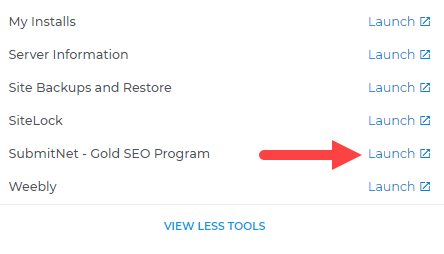
- Under HostingTools, click on SubmitNet. Note: Click View All Tools to see all listed tools.
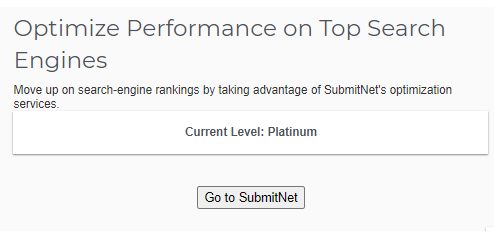
- Hit Go to SubmitNet to access the SubmitNet page.
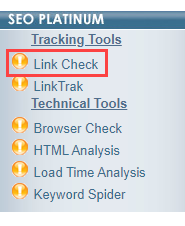
- From the left menu, select Link Check (under SEO Platinum >Tracking Tools).
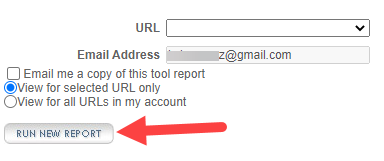
- Select the URL of the page you wish to check.
- Enter the email address where you wish to send the report.
- Click Run New Report.
Use SubmitNet's Browser Check tool
SubmitNet's Browser Check tool verifies that your site's HTML is compatible with most modern browsers.
To run the tool:
- Login to your Hosting Dashboard.
- Under HostingTools, click on SubmitNet. Note: Click View All Tools to see all listed tools.
- Hit Go to SubmitNet to access the SubmitNet page.
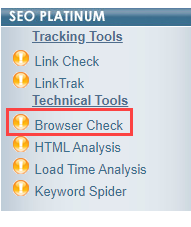
- From the left menu, select Browser Check (under SEO Platinum >Technical Tools).
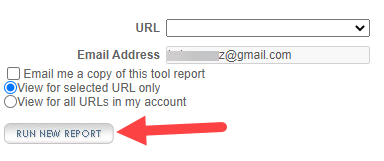
- Select the URL of the page you wish to check (or check the option to verify all site URLs).
- Enter the email address where you wish to send the report.
- Click Run New Report.
The Browser Compatibility tool may issue the following warnings after examining your site:
- Unidentifiable Tag - a tag used in the page HTML does not match any known HTML tag. Check your tags for spelling errors.
- Unidentifiable Attribute - a tag attribute used in the page HTML does not match any known HTML tag attribute. Check your tag attributes for spelling errors
- Incompatible Tag - the identified tag is incompatible with certain browsers, which will impact the functionality of your site. We recommend that you install the browser specified and make sure that your site functions as expected.
- Incompatible Attribute - the identified tag attribute is incompatible with certain browsers, which will impact the functionality of your site. We recommend that you install the browser specified and make sure that your site functions as expected.