Knowledge Base
Categories: FTP
VPS & Dedicated Hosting: How to Manage Backups with SFTP
You can download or delete the server backups on a VPS or Dedicated Server through SFTP. To do this, you'll need an FTP client like Filezilla.
This article provides steps in managing Backups with SFTP using an FTP client.
Let's get started!
- Open Filezilla.
- If you haven't downloaded Filezilla yet, please see: http://filezilla-project.org
- Go to File in the top left, and select Site Manager.
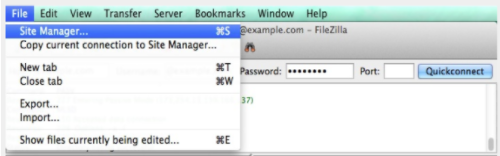
- Now click New Site. You'll need to enter the following information:
- Host: Your Server IP
- Protocol: SFTP
- Logon Type: Normal
- Username: root
- Password: your root password
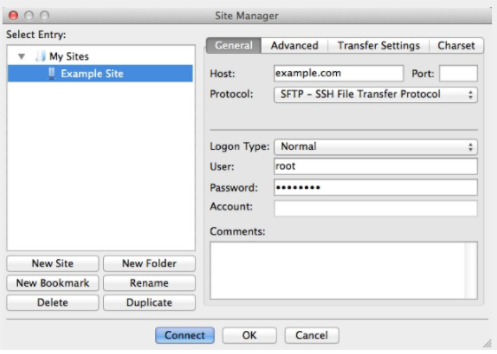
- Once you have entered the information, click Connect.
Note: When you connect, you will likely be prompted to accept the host key. Click OK and proceed.
- Once connected, you will be taken to /root (which is the root users directory; you can't do much in there); go up a directory.
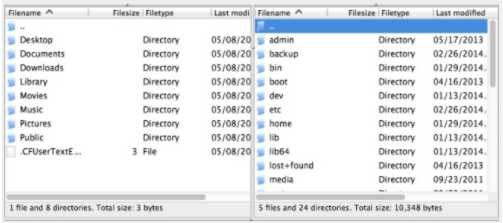
- Now that your at / you can navigate to the backup directory and then the cpbackup directory.
- If you are using Legacy Backup (the default backup manager) you'll want to go to /backup/cpbackup
- If you are using Backup Configuration then you'll want to go to /backup
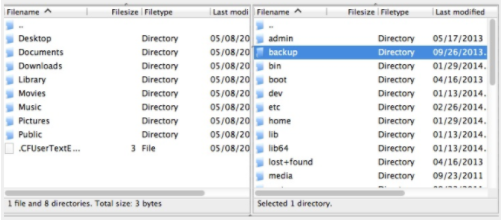
- In the /backup/cpbackup directory you will find a daily, weekly, and monthly directory. Depending on which backups you have running, you'll want to go to the directory for them. By default, daily and monthly backups are running. So if you want to modify your daily backup you'd go to the daily directory.
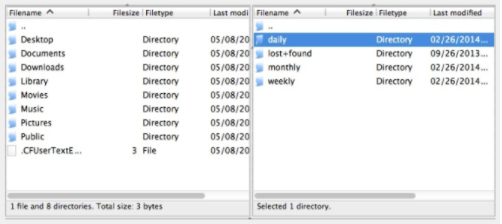
- The file you want to get will be username.tar.gz, username would be the account's Username. Once you're there, you can drag and drop the file to where you want to download it or delete it if that is your purpose.
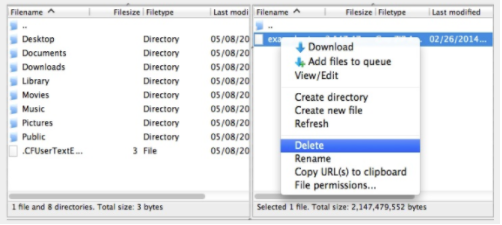
Please ensure that you download anything before you delete it. Deleting any of your files is not a good idea unless you know what it is, have a backup, or are 100% sure it's not needed.